1. Fault Overview
When the LCD screen shows, ‘G: no lock’ in the top left-hand side of the screen, OR ‘No GPS signal lock’ in the MSB and Screen Faults menu,
Access MSB and Screen Faults sub-menu by pressing and holding the menu button for 3 seconds.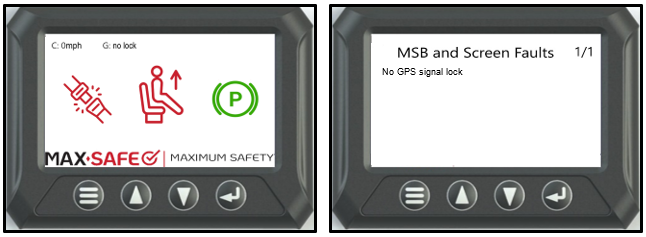
No GPS signal lock
The fault conditions will be one of below:
Conditions for setting fault
- Faulty GPS antenna.
- Loose Antenna connection at ECU.
- GPS Antenna obstructed under metal dash panels.
- Internal MSB ECU fault.
NOTE: A GPS fault is logged when the system has not obtained a GPS LOCK for five ignition cycles, with a minimum of five minutes between cycles.
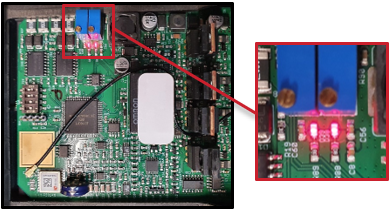
Inside the MAX-SAFE ECU housing, two LED lights are located adjacent to the two blue potentiometers. If these LEDs are flashing, the system has not obtained GPS LOCK.
DO NOT MAKE ANY ADJUSTMENTS INSIDE MSB ECU.
After completing diagnosis and rectifying any faults, a full system test must then be performed and documented on the Systems Confirmation Test – MAX-SAFE Anti-Rollaway Brake System test sheet prior to returning the vehicle to service.
STEP 1: Locate MSB ECU. Verify the GPS antenna is connected and tightly fitted to the MSB ECU.
Inspect the GPS aerial mounting position in vehicle, ensuring that it has a clear view of the sky through the windscreen and is not located under metal dash panels.
Inspect the aerial itself/cable for any damage.
Within specifications: Replace faulty GPS antenna.
Not within specifications: Replace damaged GPS antenna.
After GPS replacement: Continue to STEP 2.
STEP 2: Clear the fault by isolating the vehicle power supply at the batteries for at least 1 second, then re-connect the power supply to the vehicle.
After disconnecting and re-connecting the battery, allow up to 3 minutes before continuing with the Diagnostic Process, to allow for GPS LOCK to be achieved.
Within specifications: Verify repair with Full System Test.
Not within specifications: Continue to STEP 3.
STEP 3: With the power disconnected remove the PCB from the MAX-SAFE ECU housing. Reconnect power to MSB ECU and GPS connector. Verify the GPS LOCK LEDs (Allow up to 3 minutes to achieve GPS lock after initial power up of system).
LED’s Flashing: No GPS lock.
LED’s Solid. GPS lock achieved.
If the LEDs are still flashing, the MSB ECU has failed. Replace MSB ECU and verify repair with Full System Test.
3. Full System Test
Undertake a full system test of the MAX-SAFE Brake System and document the results on the test sheet found within the document Systems Confirmation Test – MAX-SAFE Anti-Rollaway Brake System prior to returning the vehicle to service.
Should the testing outlined within the Systems Confirmation Test fail for any reason, the system must be thoroughly inspected, diagnosed and repaired, as per the relevant Diagnostic Process document, prior to the vehicle being returned to service.
Was this article helpful?
That’s Great!
Thank you for your feedback
Sorry! We couldn't be helpful
Thank you for your feedback
Feedback sent
We appreciate your effort and will try to fix the article